Release Notes Hub

Nayax EV Kiosk

Discover Nayax EV Kiosk's latest features and updates—and how to use them to drive your growth.

January 2026

Light bulb New Features

OCPI to VPOST Solution 

Introduced a Payment Terminal Provider (PTP) integration that receives session data via OCPI and operates VPOS Touch or Onyx terminals in Spark mode, enabling OCPI network integration with Nayax VPOST & Onyx. 
Contact Nayax Energy Support to enable this feature


| Enhancements & New Features

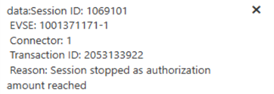
Charging Authorization Buffer 

Prevents sessions from exceeding pre-authorized payment amounts using percentage-based buffers.  

  • AC charging uses 1% buffer (set by default)  
  • DC charging uses 2% buffer (set by default)  

Configurable via Nayax Energy Core by CPOs ONLY: JSON value must be set to NULL or 0 to stop charging session exactly at authorized amount. 
If the value is greater than 0, the specified percentage is applied to reduce the charging limit accordingly. 

Check out the guide hereHow to Configure Pre-Authorization Buffers for EV Charging Sessions 


New Alert Added
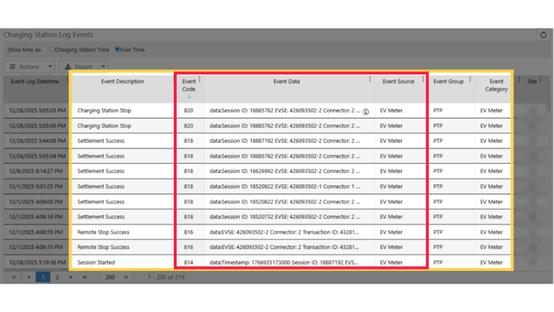
 

Check out the guide here: How to View EV Last Alerts 


  • Enhanced Occupied Connector Detection: When a connector is occupied without an active session, displays ‘Session Started Elsewhere’ message with 20-second timeout or manual Go Back option. 

  • Automatic App Recovery: On devices without app launchers, the kiosk app now automatically restarts after settings updates instead of requiring manual relaunch.
     
  • Power-up Alerts: Alerts now include default credit amount for clearer notifications and better visibility into station configuration immediately upon power restoration.
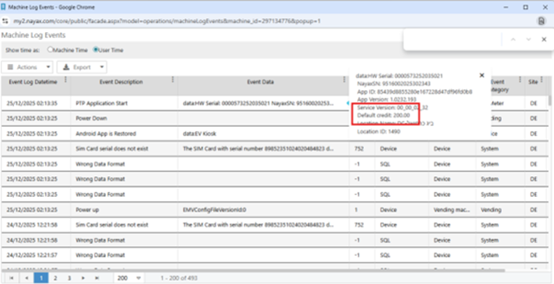
 

  • Extended Settings Timeout: Settings screen timeout increased from 30 to 60 seconds, giving operators more time for configuration. 
     

Improvements

  • Waiting Status Resolution: Resolved system getting stuck in “Waiting” status. 
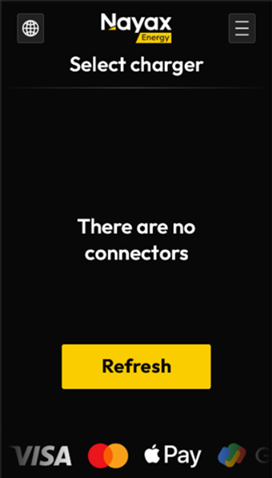
  • Connector Filter Error Handling: Empty connector filters now display error message with functional Refresh button, providing clear troubleshooting path.  
 

March 2025

New & Enhanced Features

| Missed Payment Prevention

Unsettled transactions are now automatically resent when the device restarts or reconnects, ensuring that missed payments are prevented.


UI Updates

| Idle/parking Fees Support

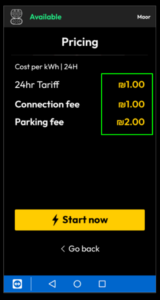
 Idle/parking Fees are now supported and visible on the EV kiosk screen.


| Smarter Cost Display

The screen will only show a cost if there’s a valid amount (non-zero) and will default to 2 decimal places unless specified otherwise.


Bug Fixes

  • Pricing Display – Ensures the pricing screen accurately reflects the correct cost for each time window.
  • Kiosk Status – Fixed incorrect status where the system showed “Occupied” while it was still preparing.


February 2025

New & Enhanced Features

| Smarter Charging Cost Options

Operators can now set the calculations of charging fees based on time instead of energy usage.


| VAT Handling

VAT will be automatically added if it’s not provided directly, especially useful with OCPI 2.1.1. (where the VAT is not sent)


UI Updates

| Connector Selection Screen Improved

The connector selection screen is clearer, with the connector’s physical reference shown at the top to support longer physical reference values.


Bug Fixes

  • Increased timeout for OCPI servers (from 30 to 90 seconds) to better support DC chargers.

January 2025

New & Enhanced Features

| Easy Language Selection

A globe icon now appears on the idle screen, allowing users to easily change the language (if enabled by the operator).

| APN Settings

 For VPOS Media 5 devices, APN settings can now be adjusted remotely — no need to be on-site.


Bug Fixes

  • Tariffs now match your local time zone.
  • Improved handling of errors like network issues or missing charger info.
action / 9 - action, cancel, close, delete, exit, remove, x icon