












TL;DR
This article guides small business owners through understanding and implementing kiosk systems to improve customer service and operational efficiency. We cover kiosk types, benefits, buying considerations, and ROI, emphasizing features like self-payment options and inventory management. Learn how kiosks can streamline transactions and enhance customer engagement, all while increasing revenue, making it valuable for business owners looking to enhance the customer journey.
In today’s fast-paced business environment, small businesses are constantly seeking innovative solutions to improve efficiency and enhance customer experiences. Self-service kiosk systems have emerged as a powerful tool for achieving these goals. These systems allow businesses to automate tasks, reduce wait times, and provide customers with convenient access to products and services.
What are Kiosk Systems and Why are They Important for Small Businesses?
Kiosk systems are interactive, self-service terminals that allow customers to independently access information, complete transactions, or perform other tasks. These systems can range from simple informational kiosks to sophisticated payment and ordering stations. They provide a seamless and efficient way for customers to engage with your business, even during peak hours or when staffing is limited. This improves customer satisfaction and can free up your employees to focus on more complex tasks.
Benefits of Implementing Kiosk Systems
Investing in kiosk systems can bring a range of benefits to small businesses:
- Enhanced Customer Experience: Kiosks provide customers with a fast, convenient, and personalized experience.
- Increased Efficiency: Automating tasks like ordering and payment reduces wait times and streamlines operations.
- Reduced Labor Costs: Kiosks can handle routine tasks, freeing up staff to focus on more complex responsibilities.
- Improved Accuracy: Automated systems minimize errors in order taking and payment processing.
- Extended Hours of Operation: Kiosks can operate even when your business is closed, providing customers with 24/7 access to certain services.
Types of Kiosk Systems for Small Businesses
Choosing the right kiosk system is crucial for maximizing its effectiveness. Here are some common types:
- Payment Kiosks: These allow customers to make payments for products or services using cash, credit cards, or mobile payment options.
- Information Kiosks: Providing information about products, services, locations, or events.
- Ordering Kiosks: Enabling customers to place orders for food, beverages, or other items.
- Check-In/Check-Out Kiosks: Streamlining the check-in and check-out process for hotels, clinics, or events.
Comparing Kiosk Systems: A Step-by-Step Evaluation Process
Selecting the right kiosk system requires careful evaluation. Here’s a step-by-step process to guide your decision:
-
- Step 1: Define Your Needs. What specific tasks do you want the kiosk to perform? Identify the key functionalities required to meet your business goals.
- Step 2: Research Available Options. Explore different kiosk vendors and compare their products based on features, pricing, and customer support.
- Step 3: Consider Integration. Ensure the kiosk system can seamlessly integrate with your existing point-of-sale (POS) system, inventory management software, and other business applications. You’ll know integration is successful when data flows smoothly between systems without manual intervention.
- Step 4: Evaluate Security Features. Prioritize kiosks with robust security measures to protect customer data and prevent fraud.
- Step 5: Request a Demo. Test the kiosk system in person to assess its user-friendliness and functionality.
The Value Proposition: Why Choose Nayax for Your Kiosk Systems
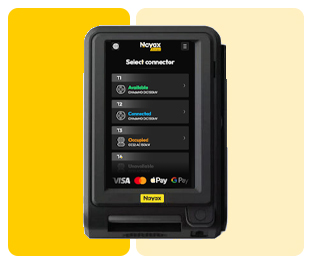
Nayax offers a comprehensive suite of cashless payment solutions and management software that seamlessly integrates with various kiosk systems. Our platform enables you to accept a wide range of payment methods, including contact, contactless, and swipe transactions, catering to the preferences of all your customers. Beyond payments, Nayax provides real-time telemetry, inventory management, and consumer engagement tools that help you optimize your business operations and increase revenue.
With Nayax, you gain access to a powerful management dashboard that provides real-time insights into your kiosk performance, inventory levels, and sales data. This allows you to make data-driven decisions to improve efficiency and profitability. Our consumer engagement tools, such as the Monyx Wallet, enable you to create loyalty programs and offer personalized promotions, fostering stronger customer relationships and driving repeat business.
Buying Considerations and Pricing Factors
The cost of kiosk systems can vary depending on the features, functionality, and vendor. Factors to consider include the initial purchase price, installation costs, software licensing fees, and ongoing maintenance expenses. While exact costs vary, many clients find that within the first few months, the increased efficiency and sales offset the initial investment. Many of our clients report improvements in transaction speed, reducing wait times and increasing customer satisfaction.
When evaluating pricing, it’s essential to consider the long-term ROI of the kiosk system. A well-designed and properly implemented kiosk can significantly increase revenue, reduce labor costs, and improve customer satisfaction, making it a worthwhile investment for your small business. Also consider the option of leasing kiosk hardware versus buying, and choosing the right Nayax payment processing plan for your business needs.
Recommendations and Next Steps
Implementing kiosk systems can be a game-changer for small businesses. By automating tasks, enhancing customer experience, and streamlining operations, kiosks can help you achieve significant improvements in efficiency and profitability. Start by defining your needs, researching available options, and carefully evaluating the value proposition of different vendors. Consider the integration aspects carefully, ensuring seamless data flow with your existing systems.
Don’t hesitate to request a demo and test the kiosk system in person to ensure it meets your requirements. After all, the right system will not only improve customer satisfaction, but also optimize your business operations, leading to increased revenue. Remember to factor in the long-term ROI when considering pricing, and start reaping the benefits of automation.
My Experience with Implementing Kiosk Systems
When I helped a local bakery implement a self-ordering kiosk in January 2023, we saw some impressive results. After we spent two weeks customizing the menu and training the staff, order accuracy increased by 15% within the first month. This meant fewer remakes and less wasted product. The owner also reported that the staff could now focus on more complex tasks, such as creating new menu items and providing personalized service to customers in the dining area. The key insight was that clear menu navigation and visual aids made a big difference in user adoption.
Frequently Asked Questions
What are kiosk systems?
Kiosk systems are self-service terminals that allow customers to independently access information, complete transactions, or perform various tasks without direct assistance from staff, enhancing efficiency and convenience.
How much does a kiosk system cost?
The cost of a kiosk system varies based on its features and functionality, typically including the initial purchase, software licensing fees, and ongoing maintenance. However, the efficiency gains and potential revenue increases can offset the investment over time.
What are the best kiosk systems to buy?
The best kiosk systems are those that integrate seamlessly with your existing systems, such as POS and inventory management software, and offer robust security features to protect customer data, while also improving accuracy.
What should I consider when buying kiosk systems?
Consider factors such as defining your specific needs, researching available options, ensuring easy integration with existing systems, and evaluating the long-term ROI to ensure it meets your business needs.
What are the key benefits Nayax provides to small businesses using kiosk systems?
Nayax provides cashless payment solutions that integrate seamlessly with kiosk systems, allowing businesses to accept various payment methods. This integration, alongside our real-time telemetry and consumer engagement tools, contributes to enhanced customer experience, reduced labor costs, and improved operational efficiency.